

- You are here:
- Home »
- Technology »
- Director of Technology Category Mapping in Ecommerce Taxonomy

Director of Technology Category Mapping in Ecommerce Taxonomy
The technology director builds the logic that organizes products into searchable paths. This role balances automation with design to ensure items appear where shoppers expect.
How the technology director oversees category mapping
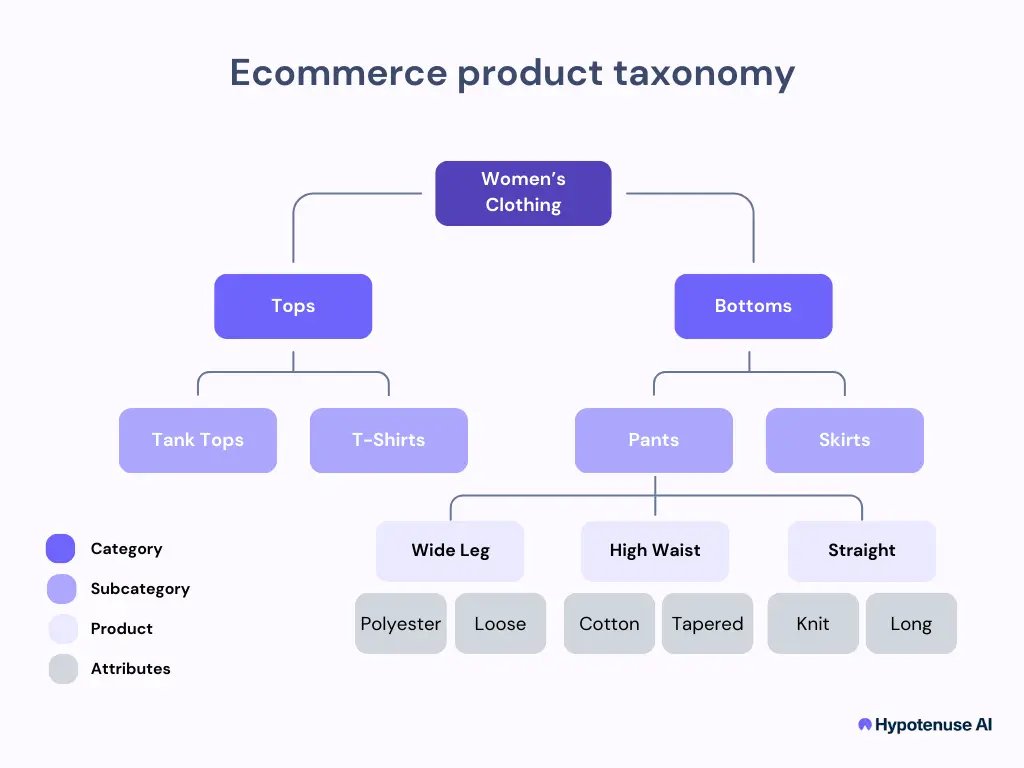
This position focuses on the architecture of product data. It isn’t just about moving folders; it’s about creating a scalable structure that allows a website to grow from one thousand products to ten million without breaking the user experience. The director defines the rules for attributes, hierarchy, and navigation. The goal is to reduce the “time-to-find” for a user, directly impacting conversion rates by ensuring that search filters actually match the inventory available in the database.
Building a scalable classification system
- Audit your current site structure to identify orphaned products or empty categories.
- Define a flat or hierarchical schema that supports your specific product range.
- Establish naming conventions for attributes like size, color, and material to prevent duplicates.
- Implement automated tagging using natural language processing to process incoming vendor data.
- Set up a manual review cycle for high-value items that require human nuance.
- Test your taxonomy against real user search queries to ensure the paths are intuitive.
- Monitor site analytics to see where users drop off and adjust the category depth accordingly.
The most important decision is choosing between a rigid, deep hierarchy and a flexible, attribute-driven search. Prioritize attributes for diverse catalogs and clear hierarchies for niche ones.
Essential metrics and performance indicators
Tracking the right data prevents your store from becoming a digital graveyard where products exist but can’t be found.
| Metric | What it tracks | Why it matters | Watch for |
|---|---|---|---|
| Search refinement | User filter clicks | Shows if your attributes work | Low clicks mean filters fail |
| Category depth | Clicks to product | Measures ease of navigation | Depth over 4 levels hides items |
| Zero-result rate | Failed searches | Identifies missing mappings | High rates mean missing tags |
| Relevancy score | Search result order | Checks if search is working | Poor ordering hurts sales |
| Automation error | System misclassification | Tracks AI accuracy | High error needs manual audit |
Ensuring high-quality data results
Success in this field relies on keeping the taxonomy clean as the business scales. Experienced managers prepare by creating a “master schema” before adding new product lines. They work in a specific order: first, they define the top-level categories; second, they apply consistent attributes; third, they map the legacy data.
Standardizing the input flow
Consistency is the hardest part of the job. If vendors send different terms for the same color, your search filters will split them into separate groups. Force incoming data through a mapping layer that translates variations into a single value.
Monitoring the user journey
Partway through any change, check your search logs. If users are searching for “sneakers” but your category is named “athletic footwear,” you need to add a synonym map. Don’t leave the system to guess; human oversight of these synonyms is what keeps a professional ecommerce site running smoothly.
Common taxonomy hurdles and fixes
| What you notice | What it means | What to do first |
|---|---|---|
| Low search results | Poor tagging | Audit product metadata |
| High bounce rate | Confusing layout | Simplify top-level navigation |
| Filter duplication | Attribute mismatch | Normalize input values |
| Hidden inventory | Bad hierarchy | Check category mapping rules |
Legal and structural requirements
You must ensure that your data structure complies with regional accessibility standards. Providing an accessible digital experience is often a legal requirement. If your site handles sensitive product categories like pharmaceuticals or chemicals, you must also adhere to specific industry standards for labeling, which are often governed by your national health or safety authority. Always consult your legal team to confirm that your product categorization meets the specific labeling laws for the regions where you operate.
Maintaining the system over time
Once the taxonomy is live, your work shifts to maintenance. Reviewing the entire structure regularly helps you remove dead categories and consolidate overlapping ones. If organic traffic drops, check if a taxonomy update orphaned top-performing products. A healthy taxonomy is never finished; it evolves as your customers change the way they search for your goods.
Why this approach fails occasionally
This system requires a robust data-ingestion pipeline for daily inventory changes. In those cases, you should switch to a simplified, manually managed “flat” taxonomy until you can afford a more sophisticated, attribute-based setup that handles the heavy lifting for you.
Can I automate all category mapping?
No, you can’t automate everything because AI often misses context. Use automation for 90% of the routine work, but keep a human team to handle high-value items and edge cases.
How often should I update the taxonomy?
You should perform a full audit regularly to keep the structure relevant. If you add a new category or product line, update the map immediately to prevent data silos.
Is it safe to change category names?
Yes, but you must implement 301 redirects for every affected URL. Changing a name without a redirect will break your SEO rankings and cause a temporary drop in traffic.
What happens if my taxonomy is too deep?
Your users will leave the site if they have to click more than three times to find a product. Keep your structure shallow and use filters to help users narrow down their choices.
How do I know if the taxonomy is working?
Check your conversion rate by category. If a category has high traffic but zero sales, your taxonomy likely led the user to the wrong place or the navigation is confusing.
Director technology, in short
As your catalog grows, you’ll find that consistent structure is the best way to scale. Start by auditing your top-level categories this week to see if they still match how your customers search. It’s a small change, but it’ll make a big difference in how easily shoppers find what they need.
About the Author Jim C.
Jim C. Clark is the lead tech blogger at TechnoHacks.net, where he delivers insightful content across a wide range of digital topics. With a keen interest in emerging technology and practical tools, Jim writes in-depth articles on AI, Python, software, and the latest apps. He also shares expert advice on freelancing, digital marketing, SEO, and business growth strategies. Known for his clear, engaging writing style, Jim breaks down complex concepts into actionable insights. Whether he's recommending the best free tools 🧰 or explaining “how to” guides, Jim’s goal is to empower readers with the knowledge they need to thrive in the digital world.
Related Posts
23 Oct, 2026Advantis Technologies Leisure Time Complete Bromine Spa Care Kit
22 Oct, 2026A Better World Spirituality and Technology Advancement Scholarship
22 Oct, 2026220W 12V Monocrystalline Solar Panels W/ 10Busbar Technology -Newpowa
21 Oct, 2026Toyota Bz4x Technology Features for Tacoma Drivers